Price History of

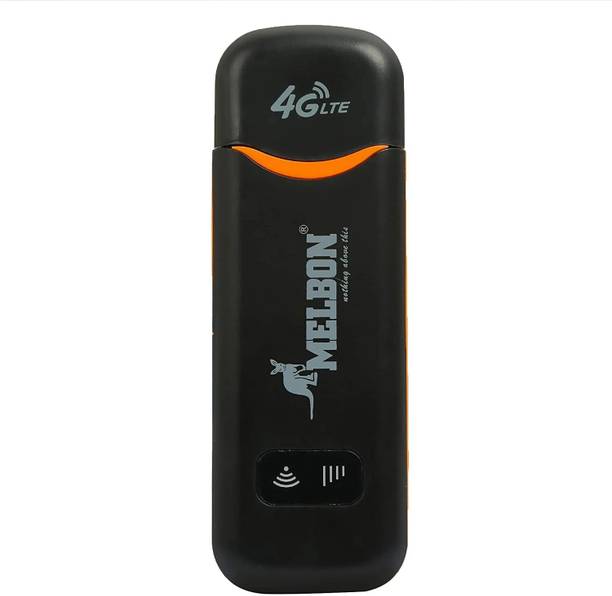
Melbon MB 4G LTE Plug and Play sim Insert WiFi Dongle & high speed data and easy to use 150 Mbps Data Card ,Calls not Supported

3.4
Current Price*
₹1,500
Lowest Price
₹1,282
Highest Price
₹1,599
Melbon MB 4G LTE Plug and Play sim Insert WiFi Dongle & high speed data and easy to use 150 Mbps Data Card ,Calls not Supported
Roll over image to zoom in
Current Price*
  • ₹1,500 70% OFF
Updated 3 hours ago
MRP
  • ₹4,999
Brand
Shop Now

Create Price Drop Alert

We'll send an email when the price drops to target price.

Flipkart Price History

Roll over the chart for price information
Current Price*
₹1,500
Lowest Price
₹1,282
Highest Price
₹1,599

Features

  • Device Throughput: Upto 150 Mbps.
  • Expandable Memory Capacity: 4 GB.
  • 3g/4g/5g.
  • Brand: Melbon.
  • Model: T708.
  • Technology: 4G LTE.
  • Melbon Dongle Best compatibility with 4G LTE all sim card.
  • Data speed: Up to 150Mbps download speed, up to 50Mbps upload speed.
  • Other features: Built-in LED indicator, WPS.
  • Tri-band frequencies:�.
  • Supports up to 10 devices:�.
  • The Melbon dongle is a plug and play device, so you can simply plug it into your computer's USB port and start using it right away..
  • The Melbon dongle is small and lightweight, making it easy to carry around with you..
  • The Melbon dongle is compatible with a wide range of devices, including laptops, personal computers, Android televisions, and smartphones.
  • Use the Melbon dongle in an area with a strong 4G LTE signal..
  • Avoid using the dongle during peak traffic times..
  • Upgrade your mobile plan to a plan that offers higher data speeds..
  • Restart your computer and the Melbon dongle..

Specifications

General

Model Name
  • 4G LTE WiFi Dongle with All SIM 4G,5G Network Support, Plug & Play Sim Insert
Sales Package
  • 1
Device Throughput
  • Upto 150 Mbps
Voice Support
  • No Call Support
Expandable Memory Capacity
  • 4 GB
Phone Book Support
  • Yes
SMS Support
  • No
Memory Card Slot Support
  • no
Operating System
  • All Smart USB Device, Laptop, PC, USB Adaptor
Power Souce
  • AC And DC
GPRS
  • 150Mbps
External Interface
  • USB port: The USB port is used to connect the dongle to a computer. SIM card slot: The SIM card slot is used to insert a SIM card. Power button: The power button is used to turn the dongle on and off. LED indicator: The LED indicator shows the status of the dongle. External antennas: The external antennas improve the signal strength of the dongle.

Product Details

Color
  • Black
SIM or UIM Support
  • 3g/4g/5g
Indicator
  • LED Indicator Meaning Solid blue light The dongle is plugged in and connected to the internet. Blinking blue light The dongle is searching for a signal. Solid red light The dongle is not plugged in or it is not connected to the internet.
Network Type
  • ALL Network, 3G, 2G, 5G, 4G LTE
Form Factor
  • dongle is a small, USB-shaped device that plugs into the headphone jack of your device to allow you to use wireless headphones with it. It is available in two different form factors: a standard USB-A dongle and a USB-C dongle.
UMTS 3G BW
  • 150Mbps DL/50Mbps UL-(with Double External Antennas)
Edge
  • Dongle Edge is a 4G LTE WiFi USB dongle stick that supports all SIM networks. It has a plug-and-play design and can provide up to 150Mbps data speeds. The dongle is also small and lightweight, making it easy to carry with you.
Other System Requirements
  • A computer with a USB port, A SIM card that is compatible with the dongle's network, A data plan for the SIM card, A power source, such as a USB charger or power bank, Insert the SIM card into the dongle., Plug the dongle into a USB port on your computer., The dongle should automatically install the necessary drivers., Once the drivers are installed, the dongle will be detected by your computer., You can then connect to the internet by following the instructions that appear on your computer screen.
Installation Features
  • Dongle can provide speeds up to 150Mbps, which is fast enough for streaming HD video, gaming, and downloading large files., Dongle uses WPA2 encryption to protect your data from unauthorized access, Check the system requirements: Make sure that your computer meets the system requirements for the Dongle. These requirements can be found in the Dongle user manual., Get a SIM card: The Dongle requires a SIM card to connect to the internet. You can get a SIM card from your mobile phone carrier., Insert the SIM card: Once you have a SIM card, insert it into the Dongle., Plug in the dongle: Plug the Dongle into a USB port on your computer., Wait for the dongle to install: The Dongle will automatically install the necessary drivers. This may take a few minutes., Connect to the internet: Once the drivers are installed, the Dongle will connect to the internet. You can then start using the internet on your computer.
Other Features
  • This Dongle Proper Work at Place:- Basement, 6th Floor,12th Floor, No Network Area But This dongle Speed 50 MB/Second, These Dongle Mostly Sales in this city,--- Bangalore, Gujarat, Tamilnadu, Jammu Kashmir, Jharkhand, Delhi, Maharashtra, Kolkata, Rajasthan

Dimensions

Width
  • 11 mm
Height
  • 7 mm
Depth
  • 2 mm
Weight
  • 40 g
* Product prices and availability are accurate as of the date/time indicated on the product page and are subject to change. Any price and availability information displayed on the store (Amazon, Flipkart, etc) at the time of purchase will apply to the purchase of displayed products.
* As an Affiliate, we earn from qualifying purchases at no extra cost to you. More info.